๐Ÿค– LangChain ยท RAG ยท FastAPI

Portfolio Chat Agent โ€” End-to-End RAG with LangChain

Built a production-ready conversational AI agent from scratch โ€” then went beyond the tutorial: redesigned the entire knowledge base after discovering that retrieval quality depends far more on input data design than on pipeline code.

LangChain ChromaDB Gemini 2.5 Flash BGE bge-small-en-v1.5 FastAPI Docker HF Spaces Firebase
๐Ÿ“„
Load Docs
โœ‚๏ธ
Chunk
๐Ÿ”ข
Embed
๐Ÿ—„๏ธ
ChromaDB
๐Ÿ”
Retrieve
๐Ÿง 
LLM
๐Ÿ’ฌ
Answer
01 โ€” Context & Objective

Why build this? A hands-on LangChain learning project

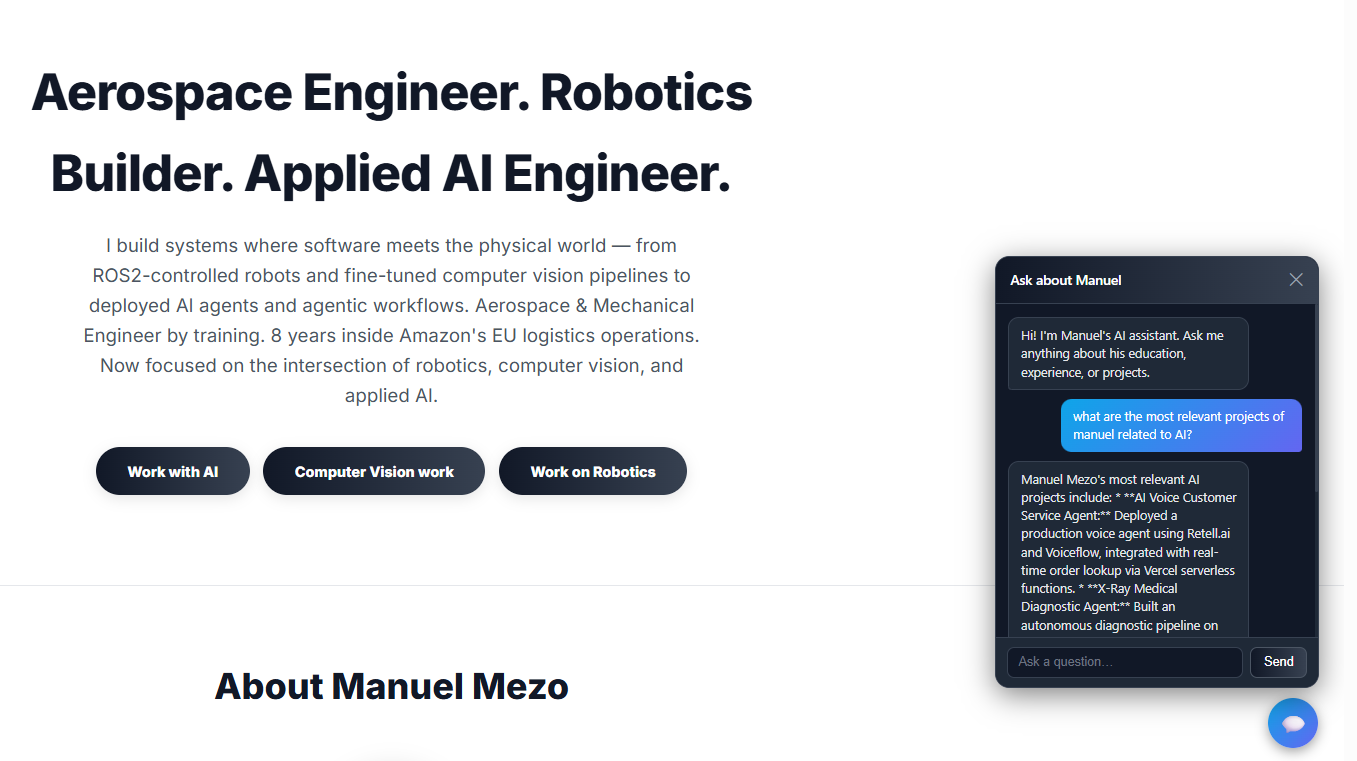
Try it live The chat agent is embedded in this portfolio. Click the ๐Ÿ’ฌ button at the bottom-right corner to ask it anything about my background, experience, and projects.

The goal was to learn LangChain hands-on by building something real and immediately useful: a chat agent for this portfolio that can answer questions about my education, professional experience, and projects โ€” grounded entirely in my own documents (CV, thesis presentations, project write-ups).

Rather than following a tutorial, the project was built end-to-end in a single day, covering every layer of the stack: document ingestion, vector search, conversational memory, API design, security, and cloud deployment.

1,042
Knowledge chunks indexed (v2)
10
Source documents (incl. 5 synthetic)
17
STAR stories โ€” clean prose
Portfolio Chat Agent โ€” live chat widget on cv.manuelmezo.com

The chat widget live on cv.manuelmezo.com, powered by a FastAPI backend deployed on HF Spaces.

01b โ€” The Real Lesson: Data Quality

Why the first version failed โ€” and what we did about it

After deploying the initial version, the agent gave poor, vague, or hallucinated answers to most interesting questions. The pipeline code was correct. The problem was the data going into it.

The "garbage in, garbage out" problem in RAG You can build a perfect retrieval pipeline โ€” correct chunking, right embedding model, well-tuned similarity search โ€” and still get poor answers if the source documents are not designed for retrieval. This is the most important lesson this project taught me, and it's under-covered in RAG tutorials.

What was wrong with v1

v1 โ€” What we had v2 โ€” What we built
Presentation slides (PPT โ†’ PDF)
Bullet fragments, no prose, minimal text per page. A slide saying "โ†’ improved DEA 300 to 90bps" is meaningless without context.
Full thesis documents + clean markdown files
Complete text with narrative, evidence, and context. Each chunk can stand alone.
Raw interview-prep DOCX
Mixed formats, bullet lists, rough notes. The 500-char splitter cut mid-story leaving fragments like "Additionally he handled with 'brio' this cross-functional project..."
17 hand-authored STAR stories in prose
Each story is a self-contained narrative unit. The splitter keeps full Situation โ†’ Task โ†’ Action โ†’ Result coherent per chunk.
No cross-cutting summaries
No single document could answer "What is Manuel's working style?" โ€” that answer lives across 17 stories, not in any one chunk.
Synthetic summary documents
Dedicated files for professional summary, technical skills taxonomy, and personality/approach โ€” designed to answer exactly those high-level questions.
Blind 500-char chunking for everything
Character count is agnostic to document structure. A 500-char cut lands in the middle of a Result paragraph.
Semantic story-level chunking for markdown
Stories are split on --- separators first. Character splitting is a fallback only if a story exceeds 1,800 chars.
No chunk metadata
Every chunk looks the same to the retriever. No way to filter by company, topic, or skill.
Structured metadata per chunk
Each story chunk carries company, skills, year fields extracted from the header, enabling future filtered retrieval.

The five knowledge documents designed for retrieval

Synthetic ยท Stories

professional_experience_stories.md

17 STAR-format stories from Amazon and McKinsey, each with metadata header and clean S/T/A/R prose. Replaces a raw interview-prep DOCX.

Synthetic ยท Summary

professional_summary.md

~600-word narrative bio covering career arc, what each role taught, and target roles. Answers "who is Manuel?" directly.

Synthetic ยท Skills

technical_skills.md

Structured skills taxonomy with evidence per skill: not "knows Python" but "used for X, Y, Z โ€” see projects A, B." Answers skills questions with specifics.

Synthetic ยท Personality

personality_and_approach.md

7 sections on working style โ€” each backed by a real story from the STAR document. Answers "how does Manuel approach X?" questions.

Synthetic ยท Projects

side_projects.md

Descriptions of all 15+ portfolio projects: tech stack, what it does, what problem it solves. Sourced from the portfolio website and GitHub.

Semantic chunking: how it works

The key insight is that different document types require different splitting strategies. A one-size-fits-all character splitter destroys narrative structure. The prepare_knowledge_base.py script applies the right strategy per file type:

def load_markdown(filepath):
    with open(filepath, encoding="utf-8") as f:
        content = f.read()

    # Primary: split on "---" story separators
    # Each STAR story stays as one coherent chunk
    raw_sections = re.split(r'\n---\n', content)

    # Fallback: split on ## headers if no --- separators
    if len(raw_sections) == 1 and len(content) > MAX_CHUNK:
        raw_sections = re.split(r'\n(?=## )', content)

    chunks = []
    for section in raw_sections:
        meta = _extract_metadata_from_section(section, filepath)
        # Sub-split only if section exceeds 1800 chars
        chunks.extend(_section_chunks(section, meta))
    return chunks

def _extract_metadata_from_section(text, filepath):
    # Pull Company, Skills, Year from the story header line
    company_m = re.search(r'\*\*Company:\*\*\s*([^|]+)', text)
    skills_m  = re.search(r'\*\*Skills:\*\*\s*(.+)$', text, re.MULTILINE)
    return {
        "source":   filepath,
        "company":  company_m.group(1).strip() if company_m else "",
        "skills":   skills_m.group(1).strip()  if skills_m  else "",
    }
Before vs. after โ€” a concrete example Question: "Tell me about a time Manuel dealt with a difficult stakeholder."

v1 answer: "Manuel has worked on several professional projects, including a cross-functional project he handled until financial and implementation approval..."

v2 answer: "Manuel dealt with a difficult stakeholder during a McKinsey engagement with a major European train manufacturer. The client's flagship project was 5.5 months behind schedule, accumulating โ‚ฌ17 million in penalties. The client's operations leadership was actively hostile toward the consulting team due to negative past experiences..."

The infrastructure didn't change. The answer quality improved entirely because the chunks retrieved now carry full narrative context โ€” company, challenge, specific actions, measurable result โ€” rather than isolated bullet fragments.
02 โ€” Document Loading

Turning PDFs and Word docs into LangChain Documents

LangChain provides document loaders for almost every file format. Each loader reads a file and returns a list of Document objects โ€” the universal unit of content in LangChain.

A Document has two fields: page_content (the raw text) and metadata (a dict with the source path, page number, etc.). This metadata travels with the content all the way to the final answer, making it possible to cite sources.

from langchain_community.document_loaders import PyPDFLoader, Docx2txtLoader

# PyPDFLoader splits one Document per physical PDF page
loader = PyPDFLoader("data/cv.pdf")
docs = loader.load()   # returns list[Document]

print(docs[0].metadata)      # {'source': 'data/cv.pdf', 'page': 0}
print(docs[0].page_content)  # raw text of page 1
Key insight The 6 source documents loaded as 92 raw pages/documents. PyPDFLoader maps exactly to physical PDF pages. Docx2txtLoader returns the entire Word file as a single Document.
03 โ€” Text Splitting

Why chunking matters โ€” and how to do it right

LLMs and embedding models have context limits. More importantly, a full PDF page often contains multiple topics โ€” sending the whole page as context would pollute the retrieval signal. We split each document into smaller chunks that each represent one coherent idea.

RecursiveCharacterTextSplitter is the recommended default. It tries to split on paragraph breaks first, then sentences, then words โ€” so chunks stay semantically coherent rather than cutting mid-sentence.

from langchain_text_splitters import RecursiveCharacterTextSplitter

splitter = RecursiveCharacterTextSplitter(
    chunk_size=500,    # max characters per chunk
    chunk_overlap=80,  # shared chars between consecutive chunks
    separators=["\n\n", "\n", " ", ""],
)

chunks = splitter.split_documents(raw_docs)

# Filter blank chunks (e.g. from empty presentation slides)
chunks = [c for c in chunks if c.page_content.strip()]

print(f"92 pages โ†’ {len(chunks)} chunks")  # 92 โ†’ 318

chunk_size

Maximum characters per chunk. Too large = noisy context. Too small = insufficient information. 500 chars works well for dense PDFs.

chunk_overlap

Characters shared between consecutive chunks. Prevents a sentence from being cut right at a boundary and losing context.

04 โ€” Embeddings

Turning text into searchable vectors

An embedding is a vector of numbers (e.g. 384 floats) that represents the meaning of a piece of text. The key property: semantically similar text produces vectors that are close together in that high-dimensional space.

This project uses BAAI/bge-small-en-v1.5 โ€” a ~90 MB model that runs entirely locally on CPU with no API calls. BGE (Beijing General Embedding) models are trained specifically for retrieval tasks, making them a better fit for RAG than general-purpose sentence similarity models like MiniLM.

from langchain_huggingface import HuggingFaceEmbeddings

# Loads the model locally โ€” downloads ~90MB on first run
embeddings = HuggingFaceEmbeddings(
    model_name="BAAI/bge-small-en-v1.5"
)

# .embed_query() converts a string to a list of 384 floats
vector = embeddings.embed_query("What did Manuel study?")
print(len(vector))   # 384
print(vector[:3])    # [-0.031, 0.072, -0.014, ...]
Embedding model choice matters for retrieval quality The project started with all-MiniLM-L6-v2 (MTEB retrieval score ~40) โ€” a fast, general-purpose model. After reviewing benchmarks, it was upgraded to BAAI/bge-small-en-v1.5 (MTEB retrieval ~51), which is the same size but ~25% better on retrieval tasks because it was trained specifically for that purpose. Cloud APIs like Gemini Embedding offer higher quality but add API cost and latency to every single query โ€” not worth it when a strong local model works just as well for this use case.
05 โ€” Vector Store

ChromaDB โ€” storing and searching vectors

A vector store is a database optimised for similarity search. Given a query vector, it finds the stored vectors that are closest to it (by cosine similarity) and returns the corresponding documents.

ChromaDB runs entirely locally โ€” no server setup, no account, no cost. It persists to disk so the index survives restarts without re-embedding everything.

from langchain_chroma import Chroma
import uuid

# Embed all chunks once and store in ChromaDB
texts   = [c.page_content for c in chunks]
metas   = [c.metadata     for c in chunks]
ids     = [str(uuid.uuid4()) for _ in chunks]
vectors = embeddings.embed_documents(texts)

vs = Chroma(persist_directory="chroma_db", embedding_function=embeddings)
vs._collection.add(
    documents=texts,
    embeddings=vectors,
    metadatas=metas,
    ids=ids,
)
print(vs._collection.count())  # 318

Why not use from_documents()?

LangChain's Chroma.from_documents() has a batching bug on some versions. Using _collection.add() directly bypasses it and gives full control.

Persisting to disk

persist_directory stores the SQLite database and HNSW index files locally. On subsequent runs, reload with Chroma(persist_directory=...) โ€” no re-embedding needed.

06 โ€” RAG Chain & LCEL

Connecting retrieval to the LLM with LangChain Expression Language

With the vector store built, the next step is connecting retrieval to an LLM. LangChain's LCEL (LangChain Expression Language) uses the | pipe operator to chain components โ€” conceptually similar to a Unix shell pipe.

from langchain_core.runnables import RunnablePassthrough, RunnableLambda
from langchain_core.output_parsers import StrOutputParser

retriever = vs.as_retriever(search_type="similarity", search_kwargs={"k": 8})

def format_docs(docs):
    return "\n\n".join(d.page_content for d in docs)

rag_chain = (
    # Step 1: add 'context' key by retrieving relevant chunks
    RunnablePassthrough.assign(
        context=RunnableLambda(lambda x: x["input"]) | retriever | format_docs
    )
    # Step 2: fill the prompt template with {input} and {context}
    | answer_prompt
    # Step 3: send to the LLM
    | llm
    # Step 4: extract the plain text string from the response object
    | StrOutputParser()
)

answer = rag_chain.invoke({"input": "What did Manuel study?"})
What RunnablePassthrough.assign does It takes the input dict and adds new keys to it without removing existing ones. Here it adds context (the retrieved text) so the prompt template has both input (the question) and context (the evidence) available.
07 โ€” Conversational Memory

Multi-turn chat with RunnableWithMessageHistory

A basic RAG chain treats every question independently. If a user asks "What tools did he use for it?" after asking about the thesis, the retriever has no idea what "it" refers to. The fix requires two additions:

# Step 1: rephrase ambiguous questions using history
contextualize_prompt = ChatPromptTemplate.from_messages([
    ("system", "Rewrite the question as standalone. Do not answer."),
    MessagesPlaceholder("chat_history"),
    ("human", "{input}"),
])
contextualize_chain = contextualize_prompt | llm | StrOutputParser()

def contextualize_question(inputs):
    if inputs.get("chat_history"):
        return contextualize_chain.invoke(inputs)
    return inputs["input"]   # first message โ€” no history, pass through

# Step 2: wrap chain with automatic history management
session_store = {}

def get_session_history(session_id):
    if session_id not in session_store:
        session_store[session_id] = ChatMessageHistory()
    return session_store[session_id]

conversational_rag = RunnableWithMessageHistory(
    rag_chain,
    get_session_history,
    input_messages_key="input",
    history_messages_key="chat_history",
)
How session IDs work Each conversation gets a UUID as its session_id. The server maps that ID to a ChatMessageHistory object in memory. The client stores the ID in JavaScript and sends it with every follow-up message โ€” this is how the agent "remembers" the conversation without any login or user accounts.
08 โ€” FastAPI Backend

Exposing the chain as a production-ready REST API

The RAG chain is wrapped in a FastAPI application, exposing a single POST /chat endpoint. FastAPI was chosen for its automatic request validation via Pydantic models, async support, and auto-generated interactive docs at /docs.

Lifespan

Heavy resources (vectorstore, model, chain) are loaded once at startup via the @asynccontextmanager lifespan pattern โ€” not on every request.

Pydantic validation

Request bodies are declared as Pydantic models. FastAPI validates them automatically and returns HTTP 422 with a clear error if the shape is wrong.

CORS middleware

Browsers block cross-origin requests by default. The CORS middleware adds the headers that tell the browser your portfolio domain is allowed to call the API.

Security layers

Input capped at 500 chars, output at 512 tokens, per-IP rate limit (10/min), daily global cap (200/day), session turn limit (20 turns).

@app.post("/chat", response_model=ChatResponse)
async def chat(request: ChatRequest, http_request: Request):
    # Rate limit โ†’ daily budget โ†’ session cap โ†’ invoke chain
    if is_daily_budget_exceeded():
        raise HTTPException(429, "Daily limit reached.")
    if is_rate_limited(http_request.client.host):
        raise HTTPException(429, "Too many requests.")

    session_id = request.session_id or str(uuid.uuid4())
    answer = chain.invoke(
        {"input": request.message},
        config={"configurable": {"session_id": session_id}},
    )
    return ChatResponse(answer=answer, session_id=session_id)
09 โ€” Deployment

Docker on HF Spaces + Firebase hosting

The API is containerised with Docker and deployed as a Hugging Face Space (free tier, always-on). The frontend portfolio is hosted on Firebase Hosting.

A key design decision: the chroma_db binary files are not stored in git. Instead, the knowledge base is exported as knowledge_base.json (plain text, version-control friendly), and the Dockerfile runs build_db.py at image build time to reconstruct ChromaDB from it. Updating the knowledge base is as simple as adding documents, re-running the export script, and pushing.

# Dockerfile โ€” builds ChromaDB at image build time
FROM python:3.11-slim
WORKDIR /app
COPY requirements.txt .
RUN pip install --no-cache-dir -r requirements.txt
COPY knowledge_base.json build_db.py .
RUN python build_db.py        # embeds chunks locally, writes chroma_db/
COPY api.py .
EXPOSE 7860                   # HF Spaces requires port 7860
CMD ["uvicorn", "api:app", "--host", "0.0.0.0", "--port", "7860"]
Links ๐Ÿค— HF Space (files)  ยท  ๐Ÿ’ป GitHub repo  ยท  ๐ŸŒ Live API docs

โ† Back to Portfolio